Many useful features can be found in LinkedIn Premium; nevertheless, there are situations when it is time to move on.
It is a simple procedure to terminate your subscription to LinkedIn Premium on your iPhone, regardless of whether you have just found a new job or want to reduce your expenses.
You’ve arrived at the perfect location if you’re seeking instructions that are easy to understand and follow. While you are here at ideasocial.net, we will give you clear instructions to assist you in effectively navigating social media.
We are going to walk you through the actions you need to take in order to “How do you cancel your LinkedIn Premium on iPhone?”
Methods for Canceling LinkedIn Premium on iOS Devices
In order to cancel your membership to LinkedIn Premium using the settings on your iPhone, adhere to the following protocols:
- Launch LinkedIn on your iOS device. Verify that you are in the same session as the LinkedIn Premium account that is currently active.
- When you’re in the app, go to the top left of the screen and touch your profile photo. Your profile settings can be accessed by clicking here.
- Locate “Settings” by scrolling down the page. There, you’ll see your present LinkedIn Premium status in the “Subscriptions”
- Although you can see your membership data on LinkedIn, you’ll have to go to the App Store on your iPhone to manage it in its entirety. This is the way to accomplish it:
- Run the Settings app on your iPhone.
- After you scroll down, find the App Store.
- Select Subscriptions by tapping your Apple ID on the top.
- Select LinkedIn Premium from the available options.
- After that, confirm by selecting Cancel Subscription.
- Your LinkedIn Premium subscription will remain active until the end of your current monthly cycle, so you won’t lose access to the service right away, even after canceling. A confirmation email about the cancellation of LinkedIn Premium on iPhone will also be sent to you.
What Happens After iPhone LinkedIn Premium Cancellation?
Once you go ahead and cancel LinkedIn Premium on your iPhone, your account will automatically return to the free version when your current payment cycle ends.
All premium services, including InMail credits, profile insights, and sophisticated search filters, will be available to you during this time.
Your connections, profile, and activity history will be preserved until the cancelation is fully implemented, but these functions will be disabled.
The basic LinkedIn account still allows you to network, join groups, and apply for jobs. You can always upgrade if you ever need to.
What are the reasons for canceling LinkedIn Premium?
Users can decide to cancel their membership to LinkedIn Premium for a variety of reasons, including the following:
1. Money Saved
For LinkedIn Premium members who don’t often use the additional capabilities, the cost might add up quickly. To make room for further investments, whether personal or corporate, it’s helpful to cancel LinkedIn Premium on iPhone.
2. Premium Features Not Used Much
When it comes to InMail credits, sophisticated search filters, and profile viewing insights, many users discover that the major benefits of Premium aren’t worth the price. So, they decide to cancel LinkedIn Premium.
3. Reaching One’s Career Objectives
For more targeted purposes, including finding a new job or expanding their company, some LinkedIn Premium subscribers pay an annual fee. They may not need the supplementary resources once they’ve accomplished their initial objectives, like finishing the recruiting cycle or landing a new job. After achieving the goal, they find LinkedIn Premium to cancel.
4. More Opt-In Complementary Options
Due to LinkedIn’s abundance of free capabilities, users can find that they don’t need Premium to accomplish most of their networking or job-seeking objectives. So, canceling LinkedIn Premium is the way they choose.
5. Changing Focus
If a person’s professional or networking goals change, such as switching industries or using other platforms more for job hunts, LinkedIn Premium may not be the best fit anymore.
For these reasons and more, LinkedIn’s free edition remains a popular choice among users, who can always upgrade if their requirements alter.
Why can’t I cancel LinkedIn Premium?
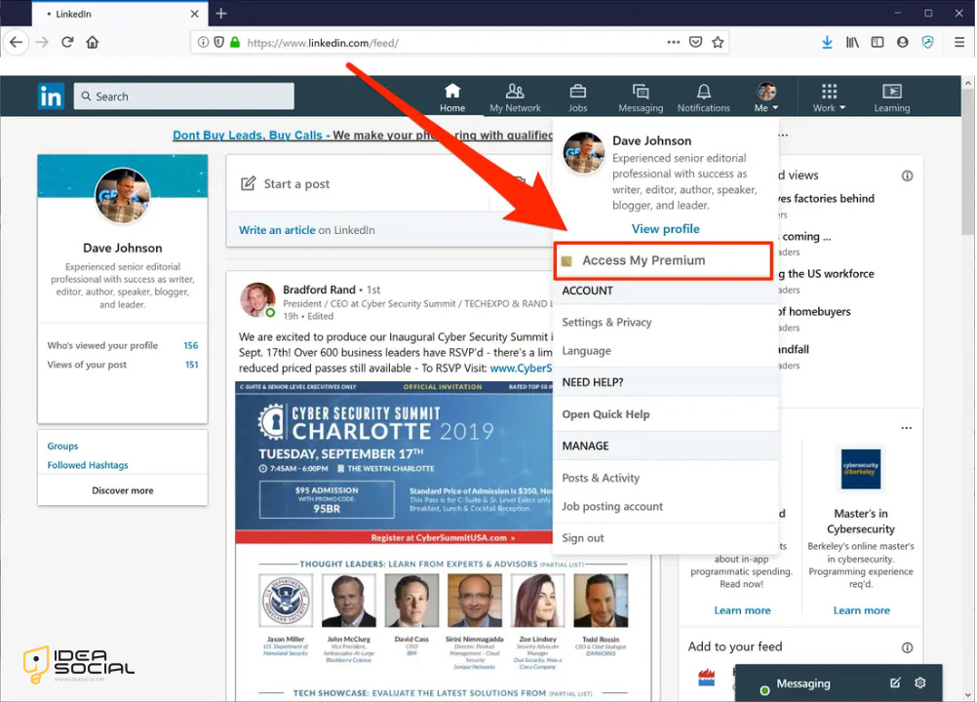
There can be a number of reasons why you are unable to cancel your LinkedIn Premium subscription.
One typical problem is that you can’t cancel your membership via LinkedIn’s website; instead, you have to go through the settings on your iPhone and find the Subscriptions option. This is because the LinkedIn iPhone app is administered through Apple’s App Store.
Technical issues or out-of-date app versions can also hinder the cancellation of LinkedIn Premium on your iPhone; in such a case, you could try upgrading or restarting the app.
Also, check that you’re logged into the right account and that there aren’t any outstanding bills or payments that could be preventing the procedure from moving forward.
Conclusion
You can set up funds for other investments by canceling LinkedIn Premium. If you’re looking to save money or don’t want the additional capabilities, the procedure on the iPhone is straightforward. If you change your mind about subscribing, upgrading on LinkedIn is a breeze.
In order to learn more about how to control your online identity and make the most of your digital life, visit ideasocial.net. To help you stay informed and in command, we provide valuable insights.
Are you prepared to maximize your LinkedIn experience? Discover further solutions right now!
Finally, we want you to share your ideas and thoughts and also add more data if we missed “How to cancel your LinkedIn Premium on iPhone?”
FAQ
Where can I cancel LinkedIn Premium on my iPhone?
LinkedIn Premium can be canceled under iPhone Settings > App Store > Subscriptions.
Do I lose LinkedIn Premium benefits immediately after canceling?
No, Premium features remain till your paying cycle ends.
After canceling LinkedIn Premium, can I rejoin?
Yes, you can re-subscribe to LinkedIn Premium via the LinkedIn app or iPhone App Store.
Why can’t I cancel LinkedIn Premium online?
Apple controls iPhone subscriptions, which must be canceled via the App Store.
What happens to my LinkedIn Premium profile & connections after cancellation?
InMail and profile viewing insights will be removed, but your profile and relationships will remain.