

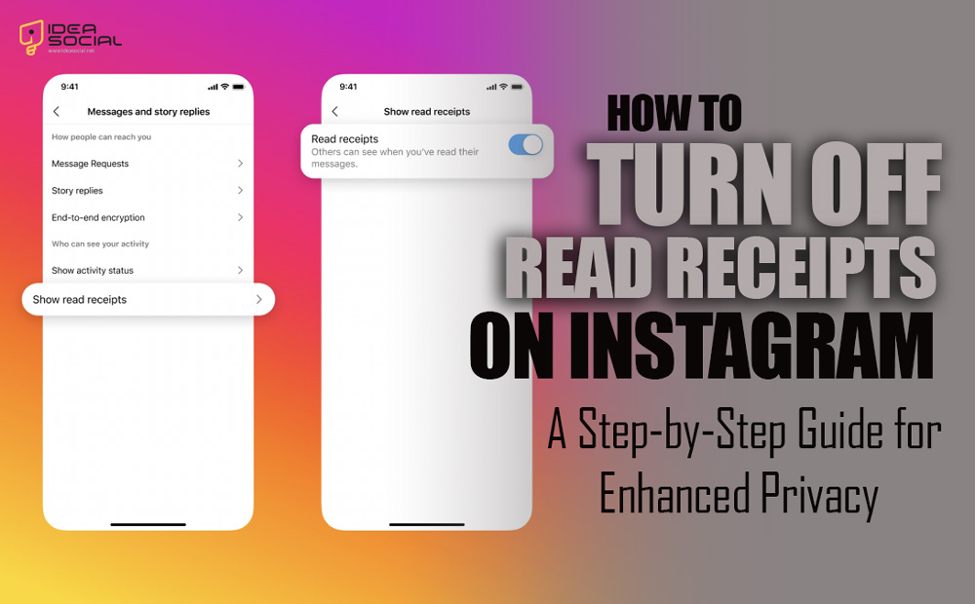
Little blue checkmarks on Instagram direct messages could make you feel like someone is watching your every action.
Everyone has experienced the overwhelming weight of anticipation while receiving a message from someone who is waiting for a response.
If you’re sick of the scrutiny from read receipts and would want some space to have private online chats, you’ve come to the correct spot.
We’ll go into several sneaky tactics that will allow you to remain undetected while still having fun on Instagram.
Learn how to be stealthy on Instagram, whether you’re trying to avoid attention or just want a break from all that digital activity.
Would you want to know “How to Turn Off Read Receipts on Instagram?” then vote for this question. This is where you need to be in Ideasocial, and we ought to inform you of that.
Turning off Instagram read receipts is a useful way to keep your conversations more private. Still, you might also be curious about how visibility works on other features, like highlights. Check out our article on does Instagram show who viewed your highlights to better understand what information is shared with others.
What is the read receipt on Instagram?
Instagram users can know when their recipients have viewed a direct message (DM) thanks to a feature called a read receipt.
In a nutshell, here it is:
- After you send a direct message (DM) on Instagram, a little “Seen” label will appear underneath your message to let you know whether the receiver has seen it.
- Just as when you’re the sender, the sender will see a “Seen” label when their message is opened by you when you’re the receiver.
You can see whether your message has been read and received using the read receipt function on Instagram, but it also makes you feel like you have to answer fast.
Why do Instagram users utilize the read receipt feature?
There are a number of valuable reasons why Instagram users use read receipts.
Crucial for managing expectations in communication, they provide a clear signal of when a message has been viewed.
The read receipts feature on Instagram makes it easy to time replies and measure engagement levels, and it also helps senders and receivers judge the state of their discussions.
As a confirmation that the communication has been seen, Instagram read receipts also encourage responsibility in interactions for users, whether in personal conversations or professional exchanges.
The general efficacy of communication is improved by this characteristic, which makes digital interactions more precise and less ambiguous.
You can now see that this Instagram feature is helpful for users and that it can improve your Instagram experience if you utilize it.
However, Instagram users may wonder how they can disable the app’s read receipts.
Let’s go to continue to be familiar with the steps:
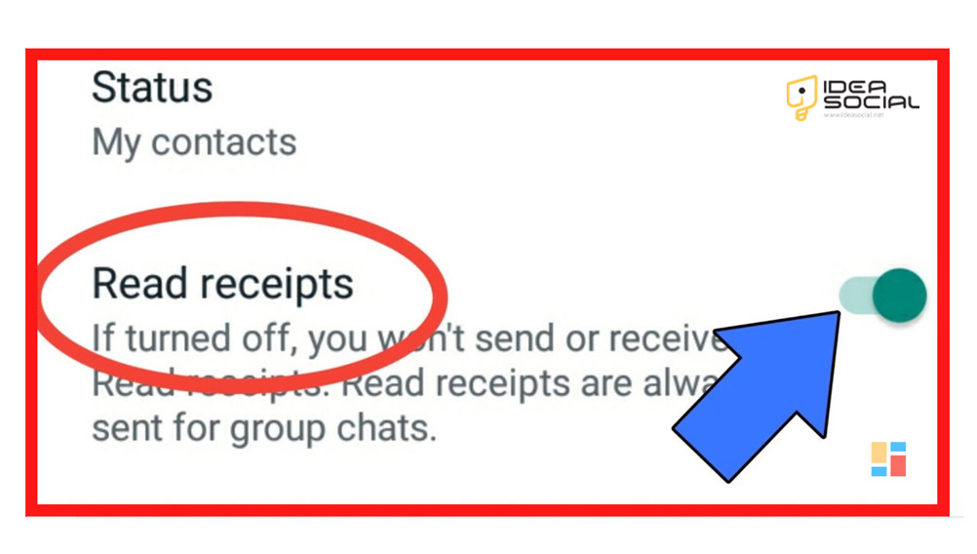
How do I turn off read receipts on Instagram?
Learn everything you need to know about Instagram’s read receipts in this handy guide. You can turn off this functionality for specific conversations or all messages using a switch:
· Hide one chat’s read receipt capability
By following these steps, you can control the read receipts for a single discussion on Instagram:
- To see your direct messages, launch the app, go to the Feed tab, and then hit the message icon on the upper right.
- To access the specifics of a chat, choose the discussion you want to manage and then tap on its name at the top of the screen.
- Following that, go to “Privacy & Safety” and then touch “Read Receipts” to turn off the option for that specific conversation.
- Giving you more control over your messaging experience, this feature allows you to change your privacy settings for individual chats.
· Hide all chat’s read receipt capability.
In order to turn off read receipts for all of your Instagram discussions:
- Go to the app’s bottom menu and touch your profile image.
- Afterward, choose “Messages and story reply” from the three-line menu that appears at the top of the screen.
- Once you’ve located the “Show read receipts” option, just press the toggle to turn it off.
- If you want more control over how Instagram treats your private messages, you can turn off read receipts for all of your Instagram chats by doing this.
What are the methods for turning off Instagram’s read receipts
There is no direct option available on Instagram that allows users to eliminate read receipts for direct communications messages totally. However, you can control your privacy by using a few different methods.
The following is a step-by-step instruction that will assist you in navigating this:
- Before you open a message, make sure you’re in Airplane Mode, which is the first way to disable read receipts on Instagram. This will disconnect you from the internet and enable you to read the message without the read receipt being triggered. To see the message while on Airplane Mode, exit Instagram entirely. Then, to return to the internet, switch off Airplane Mode.
- You can also go into your device’s settings and activate notifications for Instagram direct messages. This way, you can get a preview of your messages without opening the app and marking them as read, and you can see that you have turned off Instagram read receipts.
- Going to Instagram’s settings, touching your profile image, then the three-line menu symbol, choosing “Settings,” and turning off “Show Activity Status” is another way to deactivate your activity status on Instagram. Although this does not disable read receipts in and of itself, it conceals your online status, which might alleviate the need to reply instantly.
- By opening Instagram, navigating to your direct messages, selecting the discussion, tapping the name to access chat details, choosing “Privacy & Safety,” and then turning off “Read Receipts” for that particular conversation, you may access specific information.
- Lastly, be wary of third-party applications that promise privacy features but really violate Instagram’s terms of service or put your security in danger.
While these strategies won’t eliminate read receipts, they can help you control how they affect your Instagram messaging experience.
Conclusion
Taking charge of your privacy can feel powerful in a world where digital communication is frequently treated as a public record.
While Instagram does not provide a direct option to turn off read receipts entirely, the solutions we have discussed can assist you in controlling the exposure of your messages and alleviating some of the associated stress.
These tactics can help you feel in control of your conversations: activating Airplane Mode, previewing messages via alerts, and altering your activity status.
Want to know how to put these methods into action or find additional suggestions on “How to turn off read receipts on Instagram?”
Get control of your Instagram account right now by diving into our detailed tutorial in Ideasocial , and share your ideas and thoughts with us in the comment section.
FAQ
Can Instagram’s read receipts be turned off entirely?
In Instagram, you cannot completely turn off the read receipt feature. However, you can manage how these difficulties impact your texting experience and find solutions to avoid them.
How do you see messages without getting read receipts?
It is possible to see messages without sending a read receipt on Instagram by activating Airplane Mode. Turn Airplane Mode on before you read the message. Make sure to switch off the app when you quit it.
Is it possible to hide my Instagram activity stream?
Hide your Instagram activity status by disabling "Show Activity Status" in the "Privacy" settings. Although this won't affect read receipts directly, it will hide the time when you were last active.
Can I get a preview of a message before I read it on Instagram?
Without opening the app or pressing the "read" button, you can receive a preview of your Instagram direct messages if you've configured notifications for them.
When it comes to personal information, is it safe to rely on third-party apps?
The use of third-party apps raises security issues and might potentially lead to violations of Instagram's terms of service. Use these programs with care and be alert to any hazards.


