“Facebook Protect” is an intriguing notion that raises questions about data security and internet privacy in an age when these issues have taken center stage.
Concerns over Facebook’s involvement in disseminating disinformation, privacy breaches, and user data management have put the world’s biggest social media site under increasing scrutiny.
What makes Facebook’s security measures so unique? The complexity of this topic begs us to peel back its layers.
So, are you ready to discover the tips and tricks about “Why Facebook protects?”
What Does Facebook Protect mean?
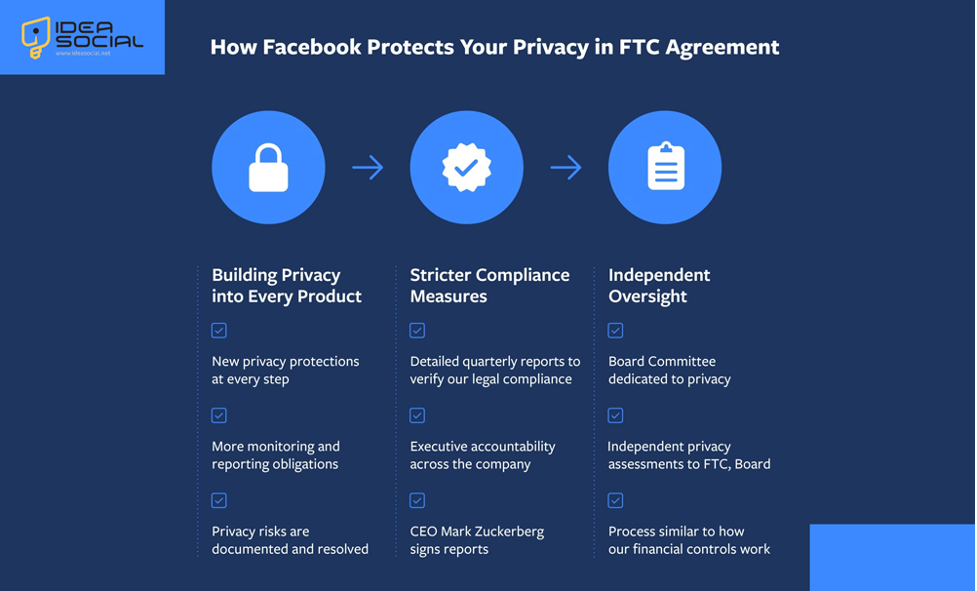
“Facebook Protect” is an added layer of defense that Facebook has implemented to keep user accounts safe from hacking and other types of cybercrime.
To further assist users in protecting their accounts and personal information, Facebook provides extra security measures beyond the usual login procedure:
- Two-Factor Authentication (2FA): Facebook users can activate 2FA to log in with a password and a mobile code.
- Login Alerts: Facebook alerts users when an unrecognized device or location accesses their account, helping them spot suspicious activities.
- Account Recovery Options: Facebook offers trusted connections and email verification to recover hacked accounts.
- Enhanced Monitoring: Facebook detects and mitigates real-time security risks, including phishing schemes and malware dissemination, using automated and manual processes.
- Risk Assessment: Facebook can analyze account activity and behavior to detect security threats and safeguard users.
(+5) Common reasons for Facebook Protect
Facebook Protect serves many goals, each of which is focused on improving the platform’s security and integrity. These aims are as follows:
1. Security for Users
Facebook Protect’s primary goal is to prevent hacking attempts, unauthorized access, and other security risks to user accounts.
Facebook provides tools, including two-factor authentication, login alerts, and account recovery alternatives, to help its customers better protect their accounts.
2. Fighting Cyber Threats
Facebook Protect is a preventative step that identifies and lessens harmful actions as they happen. This is especially useful given that cybersecurity threats are constantly changing.
The aim of Facebook’s automatic technologies and human involvement is to make the internet a safer place for everyone by detecting and eliminating malicious software and phishing schemes.
3. Upholding Honesty & Credibility
The long-term success and expansion of Facebook depend on our ability to uphold the trust of our users.
Facebook has shown its dedication to maintaining the platform’s integrity by investing in preventive measures.
To keep users and advertisers happy, it is essential to build confidence in the Facebook community by protecting it from malicious information, scams, and unauthorized access.
4. Social Media Platform Adherence
Facebook is subject to extensive regulation, with data privacy laws influencing its rules and procedures, such as the General Data Protection Regulation (GDPR) in Europe and the California Consumer Privacy Act (CCPA) in California.
Following these rules is not only legal but will also help restore public faith that previous scandals have damaged.
Facebook Protect is a way to show that you follow these rules and regulations and to protect yourself from legal trouble.
5. Importance for Business
Facebook has a responsibility to its users to keep them safe, in addition to legal and ethical considerations.
A data breach or security attack can result in financial fallout, user churn, and reputational harm.
Facebook is investing in strong security
measures to reduce these dangers and maintain its status as a top social media platform.
In general, Facebook Protect is a reflection of the company’s dedication to user security, regulatory compliance, and the sustainability of business operations in an increasingly complicated digital context.
A Guide to Activating & Deactivating Facebook Protect (Securing Your Space)
In order to activate or deactivate Facebook Protect, the following procedures were taken:
Ø Turning on Facebook Protect
- Put your Facebook credentials into the login box.
- To access the settings, open the drop-down menu by clicking the downward-facing arrow in the top-right corner of Facebook. Choose “Settings & Privacy” from the main menu, and then hit “Settings.”
- Look at the left-hand menu and look for “Security and Login.” Click on it. Then, go here to access the security settings.
- To enable Facebook Protect, locate the “Facebook Protect” section and scroll down. To manage your Facebook security settings, find “Facebook Protect” and click the “Edit” button next to it.
- The app will walk you through the steps to enable Facebook Protect, which can involve verifying your identity and setting up two-factor authentication. Just follow the prompts.
- After you’ve finished configuring Facebook Protect for your account, click “Save Changes” to finalize the changes.
Ø Turning off Facebook Protect
- Put your Facebook credentials into the login box.
- To access the settings, open the drop-down menu by clicking the downward-facing arrow in the top-right corner of Facebook. Choose “Settings & Privacy” from the main menu, and then hit “Settings.”
- Look at the left-hand menu and look for “Security and Login.” Click on it. Then, go here to access the security settings.
- To disable Facebook Protect, locate the “Facebook Protect” section and scroll down. To manage your Facebook security settings, find “Facebook Protect” and click the “Edit” button next to it.
- Follow the on-screen instructions to disable Facebook Protect on your account. This could need deactivating Facebook Protect-related security measures and verifying your identity.
- To deactivate Facebook protection for your account, confirm your changes by clicking “Save Changes” when you’ve finished the procedure.
A friendly reminder that turning on Facebook Protect can really beef up your account security. It adds extra safeguards like two-factor authentication and login notifications, among others.
Be sure you’re still adequately protecting your account if you choose to turn off Facebook Protect.
Conclusion
Finally, the multidimensional endeavor that motivates Facebook Protect is the requirement to strengthen the platform’s integrity, guarantee user security, comply with regulatory standards, and preserve its financial viability.
Facebook has instituted stringent security procedures to protect its massive user base, adapt to new cyber threats, and comply with data privacy legislation.
However, the effectiveness and openness of these security measures are still being investigated, so Facebook must continue to devise new ways to secure its digital environment.
Facebook’s ability to maintain its position as a significant force in the digital world will depend on its dedication to user security and platform integrity, especially as technology advances and online dangers continue.
This is all; we’ve gone over everything an Instagram user needs to know about Facebook Protect.
At this point in the article’s development, I would greatly appreciate your feedback on the question, “Why does Facebook protect?”